

- 🔍 After testing all discount codes, there is No Valid Coupons Currently
Verified by Lensey

No current deals. Try the free plan or visit the official site.
No coupons or deals available
right now.
You can try the free plan or visit the official website for the latest pricing and offers.
Visit Official Site









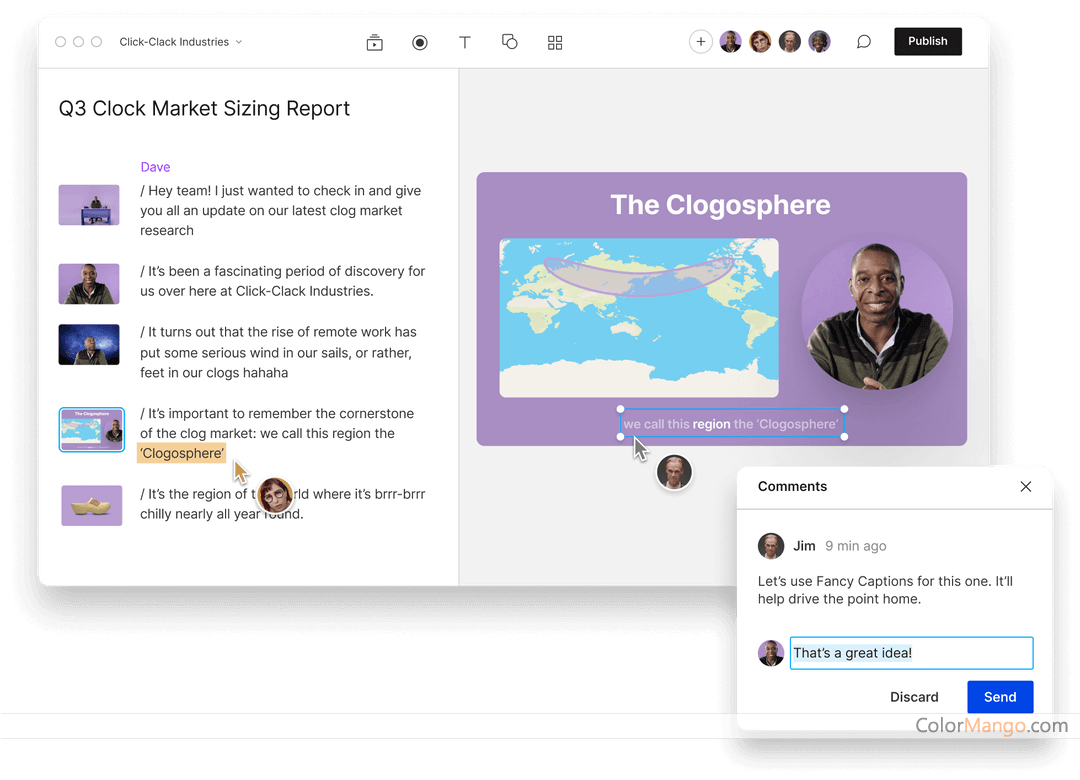

Turns meeting recordings into editable text you can edit like a doc.
Descript is an all-in-one audio and video editor. The process of editing audio and video content can be a cumbersome task due to the complexity of professional editors and the time-consuming nature of traditional multi-track timelines.Descript introduces a new category of audio and video editing. It can transcribe audio and video content into text, allowing users to edit audio and video like they would edit a document. It also integrates features such as screen recording and remote recording, and is primarily used for recording and editing conversational audio and video content as well as video communication for businesses both internally and externally.
Descript is an all-in-one desktop software for audio transcription, podcasting, screen recording, and audio and video editing. Its unique feature is the ability to transcribe audio and video content into text and correspond each word in the text with a timestamp in the audio or video. This allows users to edit the original audio and video by editing the transcribed text.
For non-professional users, editing audio and video with traditional editing software can be a time-consuming task. Descript revolutionizes the creation of audio and video content by simplifying the editing process, making it as easy and convenient as editing a Google document, and greatly improving productivity.
Customer Reviews
5.0
1 votes
Be the first to share your thoughts!
Is this a killer deal? How is the product? Share your experience and help the community shop smarter!
Customer Q&A
- ❓ Did Descript have any discounts during Black Friday/Cyber Monday?
- There were no extra discounts for Descript during Black Friday/Cyber Monday 2025.
🕵️♀️ ColorMango regularly monitors Descript deals during Black Friday/Cyber Monday and updates the latest discounts as soon as they are available.
- ❓ How does the refund process work for Descript?
- Subscription products typically do not support refunds — only cancellation of the current subscription is allowed.
We recommend starting with a monthly subscription to confirm satisfaction before upgrading to an annual plan.
If you encounter any issues, contact ColorMango Support for assistance.
