Verified & Regularly Updated We regularly check deals and remove expired or misleading offers.
Spot an error or find a better deal? Send us a better valid deal. Once verified, we’ll reward you $5. Your feedback helps the entire community keep these deals accurate. (How it works)
How ColorMango stays free To maintain our service, we may earn a small commission when you make a purchase through some links — at absolutely no extra cost to you.
🧑💼 ColorMango Extra Support
Having order or technical issues? We're here to help—working with the vendor on your behalf to get things resolved.
🛡️ Checkout
Buy directly on the vendor’s website. The vendor handles your order, with ColorMango here if you need extra help.
An ebook editing and creation tool that allows you to create and edit ebooks. It also supports a wide range of file formats.
If you are a fan of reading eBooks, then look no further than Epubor WordMate. It is an eBook editing tool that allows you to create and edit eBooks on documents, but of course, you can also use this software as a reader to read eBooks in the software!
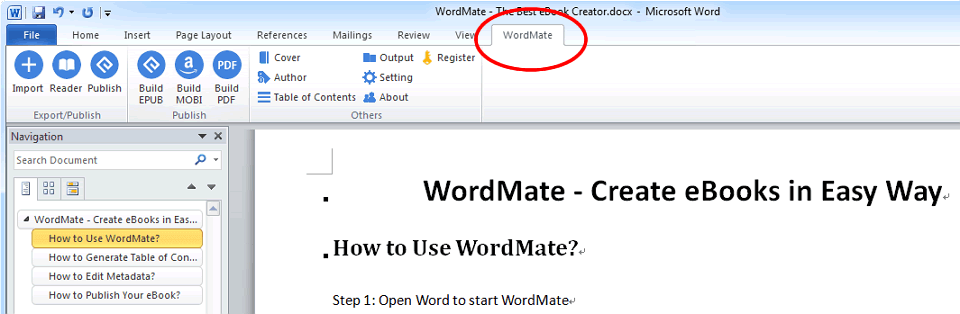
Epubor WordMate provides you with eBook editing functions, and you can easily edit fonts and text formatting with word functions in the software to get the best reading experience. Or edit and modify the text and regenerate the export. The export format is also very rich, supporting EPUB, MOBI, PDF, and other formats.
Epubor WordMate is an MS Word add-in. It enables you to create eBooks from MS Word documents. With just a few clicks, you can create Word files to EPUB, MOBI, PDF eBooks and publish them to Amazon Kindle, Apple iBooks, Nook, Kobo, Google Play, etc. And you can read them in Word instantly. And you can read and edit EPUB, MOBI, PDF eBooks in Word instantly.
Besides, WordMate also lets you read and edit all EPUB, MOBI, PDF eBooks in Word. So it's convenient for writers and readers who have multiple eBook formats. It also supports: AZW, AZW3, AZW4, PRC, TXT, HTMLz, TPZ, Topaz, etc. Just import your eBooks and easily edit the fonts and text formatting with word features for the best reading experience.
All in all, Epubor WordMate is powerful, easy to use, and convenient. With just a few clicks, you can create Word files to EPUB, MOBI, PDF eBooks and publish them for Amazon Kindle, Apple iBooks, Nook, Kobo, Google Play, etc.
Customer Reviews
4.0
1 votes
5
0% (0)
4
100% (1)
3
0% (0)
2
0% (0)
1
0% (0)
Be the first to share your thoughts!
Is this a killer deal? How is the product? Share your experience and help the community shop smarter!
Customer Q&A
❓ Why isn’t my Epubor WordMate promo code working?
❓ Are the Epubor WordMate promo codes on ColorMango legitimate?
All Epubor WordMate promo codes are obtained through sources — including direct brand partnerships, verified newsletters, and manual verification by our editors. Every discount is carefully reviewed and tested by the ColorMango team to ensure authenticity and safety. 💡 You can use these promo codes with full confidence to enjoy discounts.
❓ How often are Epubor WordMate promo codes updated?
Over the past year, Epubor WordMate promo codes have been updated 1 times. The codes displayed on this page are the latest, verified, and highest discounts (user-reported invalid: 0 times), so you can use them with confidence. We continuously monitor and partner channels and update the codes immediately when new promotions are found.
❓ Did Epubor WordMate have any discounts during Black Friday/Cyber Monday?
There were no extra discounts for Epubor WordMate during Black Friday/Cyber Monday 2025. 🕵️♀️ ColorMango regularly monitors Epubor WordMate deals during Black Friday/Cyber Monday and updates the latest discounts as soon as they are available.
❓ How to request a refund for Epubor WordMate?
Most software offers an unconditional refund guarantee within 7–30 days. You can check the refund policy of the product, or contact ColorMango Support — we’ll assist you in completing the refund process smoothly.